 minute read
Automated Setup May Not Function
iOS devices may not complete automated setup by Mobile Access Management Workflow or Apple Configurator.
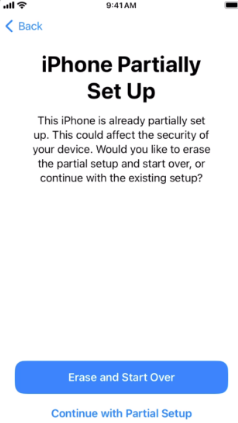
Devices that have been updated, force recovered, or erased my display the "iPhone Partially Set Up" message on the screen afterwards
-
The MAM Workflow may display success even when this screen opens. Devices on this screen may not check in with the Locker app successfully.
-
The issue may not appear on all device models.
Workaround
-
For Workflows containing an iOS Update or Erase action, adding
RebootPostInstallBootDelay: 240orRebootPostEraseBootDelay: 240as a Launchpad Custom Option may mitigate the effect of this bug. -
Any Workflows assigned to an Automation rule with conditions ‘Device State is Erased’, may require adding an artificial delay. This can be accomplished by adding a Send Webhook Workflow action Before Deployment to http://apple.com:81
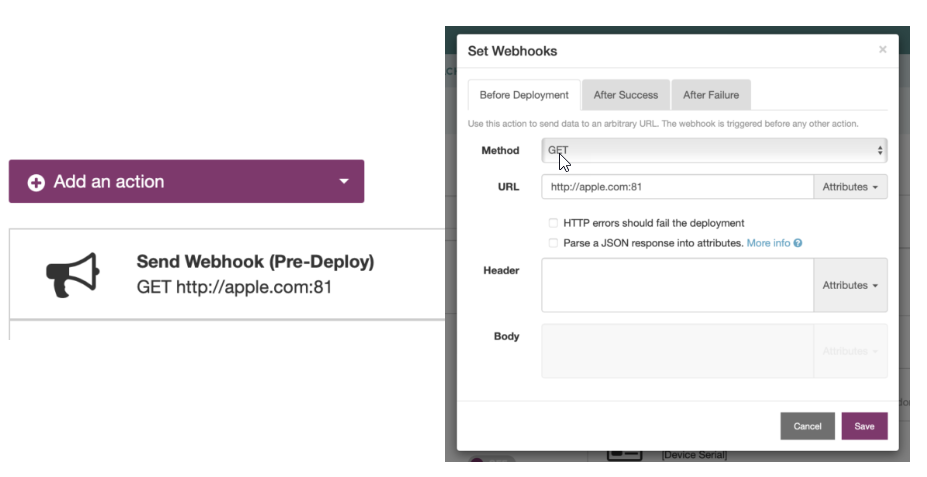
Some slow devices may require setting the RebootPostInstallBootDelay and RebootPostEraseBootDelay to values greater than 240 seconds.
If 240 seconds does not work, add more time as needed.
This bug has been reported to Apple and acknowledged (FB13476589). Imprivata expects that a fix will be available in a future version of iOS. Additional details will be published when available.


